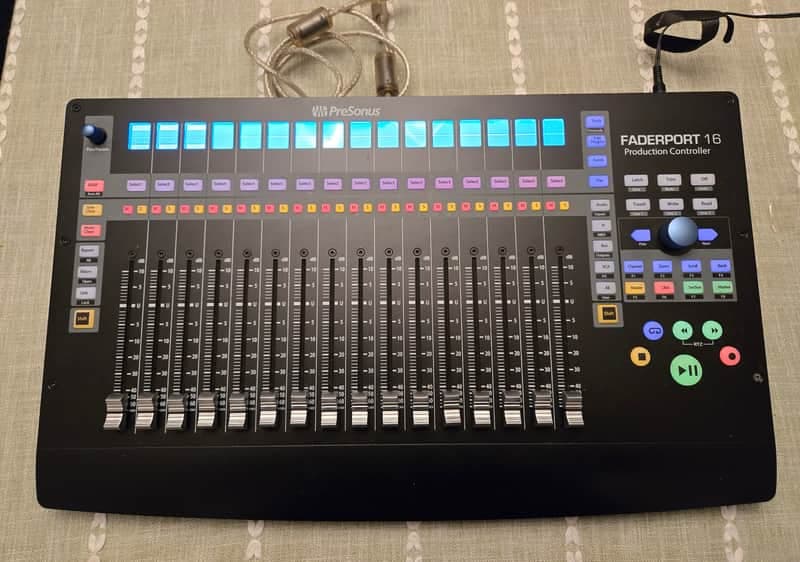
PreSonus Faderport 16 USB DAW Control Surface is a used item in very good condition, listed on Reverb. The asking price is £381. It is offered by AV Gear 4 U through Reverb. Local pickup is available. It is in our Controllers & MIDI category. 21 similar listings have a median asking price of £392. Used Gear Hunter first saw this listing on 26 November 2026 and last saw it on 27 November 2026. It has been seen 4 times in our scans. Prices are converted from the seller's currency when we scan the listing, so the amount you pay may differ slightly. The seller sets shipping, and import duty or VAT may apply, so check the final cost and the item's details on Reverb before buying.
From the seller
This Faderport 16 is in Very Good to Excellent condition. Includes USB cable, power supply and Gator hard-sided case.
Maximize Control Over Your DAW With The Presonus Faderport 16 16-Channel Mix Production Controller Don't Kill That Mouse-give It a Companion
Although a keyboard and mouse are tried-and-true DAW-control devices, they're far more effective when used in tandem with the FaderPort's precise tactile control over mix and automation functions. A superior solution for anyone who mixes in the box, only the FaderPort 16 provides 16 100 mm touch-sensitive, motorized faders and 89 buttons covering 104 different functions, all in a compact chassis that easily sits on any desk. Quickly zoom in on audio files for editing, modify plug-in parameters, manage aux mixes-and, of course, control track levels with the touch of a finger. With the FaderPort 16, you'll enjoy the fastest, most efficient workflow you've ever experienced.
Work Faster And Smarter
Rather than forcing you to revise your mixing method, the FaderPort 16 augments the way you currently mix. You still use your faithful keyboard and mouse for things they do well, and the FaderPort 16 handles what you really want to get your fingers on: your mix. Having the ability to control the levels of 16 channels at once makes creating the perfect mix easier than ever before. And the FaderPort 16 allows you to view just the information you need to access. Sixteen digital scribble strips provide visual feedback. Quickly navigate between tracks and buses. Need to automate your virtual instruments? The FaderPort 16 lets you view just those tracks, making switching automation tasks a breeze. This is DAW control the way you always hoped it could be!
One-Button Access To Key Functions
The FaderPort 16's unique Session Navigator provides easy access to eight mission-critical functions for maximum flexibility. Use the large encoder button and companion buttons to edit and mix with greater efficiency and speed. Scroll through your timeline, using the encoder, or work measure by measure with the arrow buttons; zoom in and out on the timeline with the encoder and make your tracks larger or smaller with the arrow buttons; navigate and drop markers; and maintain constant control of your main level. Once you start using the Session Navigator, you'll wonder how you mixed without it.
Universal Compatibility and Tight Studio One Integration
FaderPort 16's streamlined workflow and support for the Mackie Control and HUI protocols make it fast and easy to control virtually any DAW. No driver installation is necessary; just plug the control surface into a USB port and take command of your mix and plug-ins.
The FaderPort 16 is downright magical when used with PreSonus Studio One. (Studio One Artist is included.) You'll be amazed how much faster you can work.
An amazingly fast, efficient studio workflow awaits you!
With the compact, easy-to-use FaderPort 16, you'll enjoy the fastest, most efficient workflow and the most session control you've ever experienced.
16 touch-sensitive, 100 mm long-throw, motorized faders
16 Scribble Strip displays
Complete recording-transport controls: Play, Stop, Fast Forward, Rewind, Record, Loop
Drop Marker, Next/Prev Marker, Next / Prev Event
General session controls: Undo/Redo, Arm All, Solo/Mute Clear, Track Management, Click On/Off
Session Navigator provides quick control over Track Scrolling, Channel Banking, Timeline Scrolling, and much more
Channel Controls: Level, Pan, Solo, Mute, Rec Arm
Automation Controls: Touch, Latch, Trim, Write, Read, Off
Optional Fader functionality: Plug-in edit, bus sends, pan
Mac / Windows compatible with native Studio One support and HUI and Mackie Control Universal emulation
Footswitch input for hands-free start/stop
USB 2.0 connectivity
SPECIFICATIONS
Input/Ouput
1 USB 2.0 port
1 Footswitch jack for hands-free stop/start
Faders
16 100 mm long-throw, touch-sensitive, motorized faders
Dual-servo motorized drive belt system for fast and quiet operation
Ultra-smooth feel and lightning fast
Heavy-duty construction
Resolution: 10-bit, 1,024 steps
Buttons And Knobs
General Controls: Undo/Redo, Arm All, Solo/Mute Clear, Timecode, Track Management, Click On/Off, 4 programmable User buttons, 8 Function buttons, Macro, Parameter Link, Bypass Plug-ins
Channel Controls: Level, Pan, Solo, Mute, Select, Rec Arm
Automation Controls: Touch, Latch, Trim, Write, Read, Off
Optional Fader Functionality: Plug-in Edit, Bus Sends, Pan
Window View: Mix, Project, Transport, Undo
Transport: Play, Stop, Fast Forward, Rewind, Record, Loop, Return to Zero (Functionality varies slightly, depending on the DAW.)
Navigation: Track Scroll, Channel Banking, Timeline Scroll, Horizontal Zoom, Vertical Zoom, Drop Marker, Next/Prev Marker, Next/Prev Event, Scrub, Nudge
Console Management: Show/Hide: Audio Tracks, Inputs, MIDI Tracks, Buses, Outputs, VCAs, FX; Show All
Displays: 16 digital scribble strip…