Back to Browse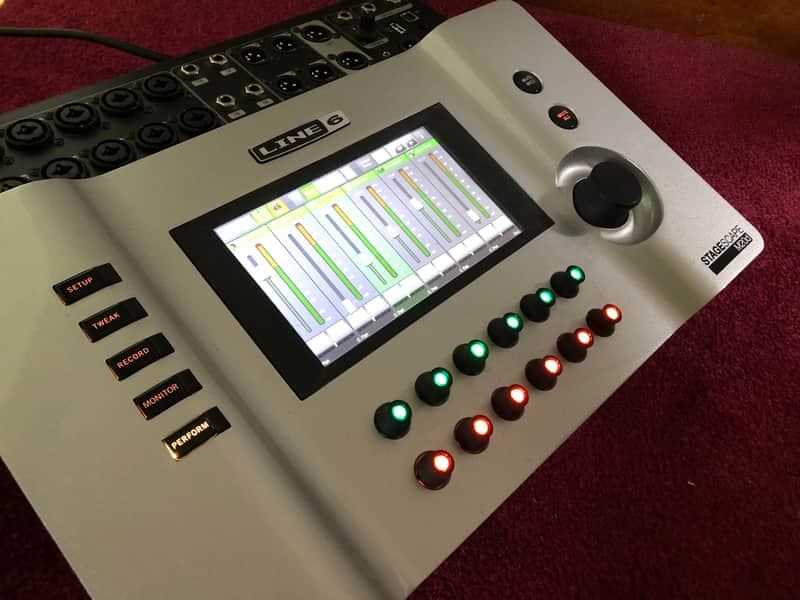
Line 6 Stagescape M20d
£866
Price dropped from £870
ExcellentReverb6d agoLocal pickup available
Sold by
J
Jesta's Gear Emporium
Details
- First Seen
- 21 November 2026
- Last Seen
- 27 November 2026
- Times Seen
- 13
About this listing
Line 6 Stagescape M20d is a used item in excellent condition, listed on Reverb. The asking price is £866. It is offered by Jesta's Gear Emporium through Reverb. Local pickup is available. It is in our Consoles & Mixers category. Used Gear Hunter first saw this listing on 21 November 2026 and last saw it on 27 November 2026. It has been seen 13 times in our scans. Prices are converted from the seller's currency when we scan the listing, so the amount you pay may differ slightly. The seller sets shipping, and import duty or VAT may apply, so check the final cost and the item's details on Reverb before buying.
From the seller
I'm reluctantly selling my fantastic Line 6 mixer - I bought a bigger desk so haven't used the Stagescape M20d in a while now. It's a great desk, suitable for experienced sound people as well as those new to mixing due to it's easy to understand touchscreen functions.
Everything works well, but the large rotary controller could do with a service as although it works it is temperamental and seems to need the contacts cleaned. I don’t actually use the large knob at all, the small knobs do everything I need but mostly I just use the app on my ipad from which you can use the same knob if needed.
It comes with it's original box and also INCLUDED is a sturdy flight case. Also included is a USB wifi dongle which can be used to control the desk remotely from an iPad (I haven't really used the USB dongle as I was always standing right next to the desk!)
The information below is from Line 6's website at
STAGESCAPE M20d
Smart mixing system for live sound.
A Smarter, Faster Path to Great Live Sound
StageScape® M20d is the world's first smart mixing system for live sound. Utilizing a groundbreaking touchscreen visual mixing environment, StageScape M20d streamlines the way you mix to get your sound dialed in quickly and stay in the creative zone. Massive DSP power delivers comprehensive, professional audio processing on every channel including multi-band feedback suppression. Pristine audio quality will impact your stage performances, and multi-channel recording allows you to easily capture every rehearsal or show, with or without a computer. The entire system can be controlled remotely from the stage or audience with one or more iPad® devices. StageScape M20d is the integrated professional mixing system that delivers great live sound, so you can focus on what’s most important: your performance.
With 18 analog inputs and 2 additional digital inputs, StageScape M20d is the most powerful and flexible portable mixer on the planet. Every channel features a professional suite of Dynamics, EQ and FX processors including multi-band feedback suppression. Connect one or more iPad® devices for full remote control over your mix. Set individual monitor mixes from the stage, tweak the FOH mix from the audience and more. Enhance your live sound experience with Fader View options and signal chain presets created by A-list artists.
Line 6 StageScape M20d touchscreen edit mode to mix digital live sound product image
Touchscreen Visual Mixing
StageScape M20d features an intuitive, 7” full-color resistive touchscreen interface to get you mixing fast. The touchscreen displays icons on a stage that represent each performer or input, replacing generic rows of knobs and faders. Now you can reach for elements in the mix as you see them on the stage in front of you. A single touch on a performer’s icon gives full access to all parameters relating to that channel, from basic tweaks through deep effects editing.
Intelligence is built into every aspect of the StageScape M20d visual mixing environment. As soon as you plug in mics or instruments, the screen shows a Stage Icon Gallery that allows you to choose from a variety of icons, representing the most common input types and devices (male/female vocal, keyboards, drum kits, electric and acoustic guitars, etc.). You can use these icons to make a visual representation of the actual stage you are setting up. Need to adjust the level on the lead vocal? Just tweak the illuminated encoder that’s color-matched to what you see on screen. Want to pan the guitar? Just touch its icon and you have full access to all of the parameters related to the guitar channel.
StageScape encourages you to stay in the creative mindset of a musician. Using simple descriptors like “bright” or “punch,” StageScape enables you to quickly get to sounds that require multiple parameter changes. The innovative X-Y interface allows you to adjust everything with one finger — what used to be many adjustments becomes a swipe of the touchscreen. Instead of getting caught up in analytics, StageScape enables you to use your ears to achieve great vocal and instrument sounds.
Line 6 StageScape M20d fader view to mix digital live sound software screen image
Fader View
For a more traditional mixing experience, you can instantly switch to Fader View and use virtual faders to mix inputs and groups, FX returns, main and monitor outputs, and more. Fader View also enables you to mix monitor sends on faders for those “Can I get more me in my monitor?” moments. And when your singers want to hear reverb or delay on their vocals, you can send master effects to their monitors. Easy and intuitive, these features are typically only found on more expensive digital consoles.
Fader View is available on the StageScape M20d display as well as the StageScape Remote iPad app. For the best of both worlds, you can use Stage View and Fader View together. For example, set StageScape M20d to Stage View and your iPad to Fader View and bank through faders…